
- Download count 567
- Pageviews 1875
- Unique foldername
- Skin for
- Track Mod for
- Based on
- Release date 2026-04-19
- Version from
- Version
- RVW-ID 46769
- Category Modification
-
Score
 97/100
(6 votes)
97/100
(6 votes)
- Unconventional car?
- Construction
- Engine
- Transmission
- Top speed mph
- Total weight kg
- Acceleration m/s²
- Construction
- Track difficulty
- Track length m
- Reverse version available?
- Time trial times available?
- Practice mode star available?
- Online multiplayer compatible?
NOTE: You need lua modloader for this modification
link: https://www.revoltworld.net/dl/rvgl-lua-modloader/
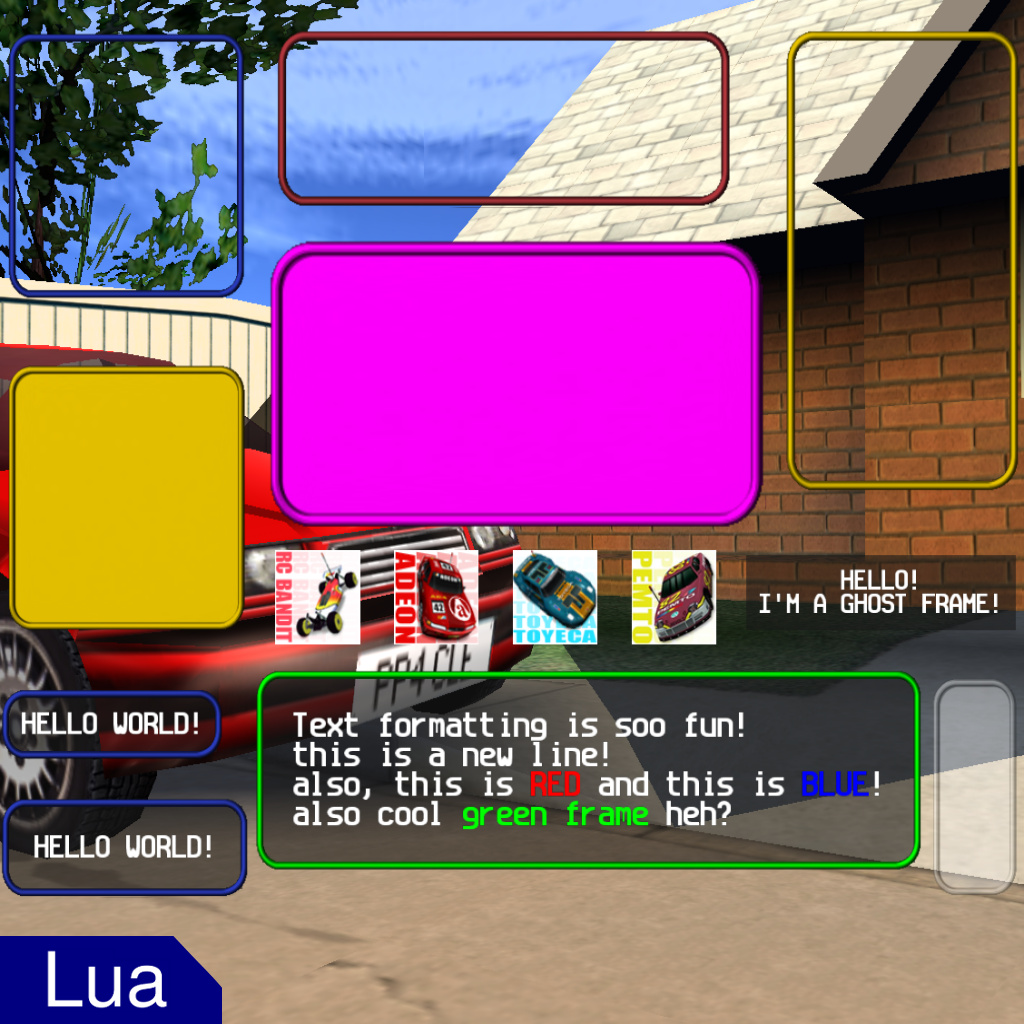
this is a script utility library that adds new functions to easly draw custom GUI elements. An example script that showcases all the functions is also included.
_________________________________
how to include these utilities in your lua script:
copy the following on top of your lua script:
--@require custom_gui_utility.lua
local draw_frame = ml.get_shared_function("custom_gui_utility::draw_frame")
local draw_frame_text_box = ml.get_shared_function("custom_gui_utility::draw_frame_text_box")
local draw_panel = ml.get_shared_function("custom_gui_utility::draw_panel")
local draw_carbox_by_model = ml.get_shared_function("custom_gui_utility::draw_carbox_by_model")
_________________________________
functions in this script utility library:
draw_frame(x, y, w, h, r, g, b, a, thickness)
Draws a GUI frame using the original game sprite sheet, in the specified xy position and with the specified width and height.
Thickness is used to change the thickness of the frame borders, 1.0 will look like most of the original GUIs in the game.
You can also use custom color for it, but if you want to replicate the original colors here are the values:
blue 42, 59, 187
yellow 230, 194, 0
red 177, 55, 61
draw_panel(x, y, w, h, r, g, b, a, thickness)
Draws a GUI panel using the original game sprite sheet, in the specified xy position and with the specified width and height.
Same arguments as draw_frame ... the only difference between panel and frame is that the panel has solid color background.
draw_frame_text_box(text, x, y, pad_x, pad_y, r, g, b, a, font_size)
This is an extended version of draw_frame that on top of drawing the frame also draws the semi transparent background in it and writes text in it.
In this case the width and height are calculated automatically depending on the text written in the frame.
You can use pad_x and pad_y to change the distance between the text and the edges of the frame.
draw_carbox_by_model(model_id, x, y, w, h, r, g, b, a)
Draws a carbox image by car model_id, handling both sprite sheets (for stock cars) and single images (for custom cars).

![[Lua] Extended Frontend](https://www.revoltworld.net/wp-content/uploads/2026/04/260411111526495731-200x200.jpg "[Lua] Extended Frontend")
![[Lua] Additional Unlocks](https://www.revoltworld.net/wp-content/uploads/2026/04/260410141626593972-200x200.jpg "[Lua] Additional Unlocks")
![[Lua] Frontend Car Rotator](https://www.revoltworld.net/wp-content/uploads/2026/03/260330123125052035-200x200.jpg "[Lua] Frontend Car Rotator")






This can support Dreamcast cars, but by default, it doesn’t. I understand why, but even if you try to fix it by extending the range, the image for Purp XL gets pulled instead of the image for RC Phink, and I’m assuming that’s no longer just simple math. For context, I’m testing this with Race Position HUD by Dioda313 but since this is the main function that is being used by the other modification, the fix or update needs to be applied here. Could an optional Dreamcast fix be included for this? Thank you in advance, it would be great to see Dreamcast getting detected working properly in the future!
you can check how this script is structure to understand how to make utility libs
the important part is to share the functions you make by using set_shared_function() insite init() and then explain at the top of the script library how to retreive them in any other script(–@require your_lib_name and then all the get_shared_functions)
it is important to note that it is only possible to share self contained functions (your functions cannot reference anything outside of them) due to set_shared_function() limitations
How to make custom Lua utility ies? Thanks in advance!