
- Download count 434
- Pageviews 1826
- Unique foldername
- Skin for
- Track Mod for
- Based on
- Release date 2026-05-12
- Version from 2026-05-12
- Version
- RVW-ID 46996
- Category Modification
-
Score
 100/100
(5 votes)
100/100
(5 votes)
- Unconventional car?
- Construction
- Engine
- Transmission
- Top speed mph
- Total weight kg
- Acceleration m/s²
- Construction
- Track difficulty
- Track length m
- Reverse version available?
- Time trial times available?
- Practice mode star available?
- Online multiplayer compatible?
- Tesla
- RG4
- Hurricane
- Super Wheat
- El Gekko
- Bulkhead
- Eatium
- JD 1
- Reddlum
- Hotknife
- SchoolVolt II
- Manfred
- Ladybug
- Vibe Box
- Bendor
- P147 Turbo
- Neifion
- Flower Power
- Phenom
- RVFD
- Cloromorph
- Touga
- Mambra
- Pemto
- R & B Team
- Infinity
- Mach
- Wildstar
- Mugello
- Patriot
- Redhead
- Kurozu
- V-Maxx
- Devyaty
- Elyta
- Sylea
- BLK
- Starmac
- P4 Super
- Spectron
- Screamer
- Sideswipe
- RVRC
- Alterego
- Armand
- Puro Aire
- Warbird
- RV GP
- .SR
NOTE: You need lua modloader for this modification
link: https://www.revoltworld.net/dl/rvgl-lua-modloader/
Also you need Custom gui utility library
link: https://www.revoltworld.net/dl/lua-utility-custom-gui-utility/
This modification adds the following things:
1) The ability to add new additional carboxes in any frontend's car selection screen:
you can define them in a file called carbox_layout_ + frontend folder name + .txt that needs to be placed in the mods folder.
for example for the default frontend, since it's folder name is "frontend" the carbox layout file will be: carbox_layout_frontend.txt
as another example, for Kiwi's custom toy world frontend you would use carbox_layout_frontendtoy.txt instead.
2) The ability to change the order of car selection and track selection to any desired order:
Order of lines in carbox_layout_frotnendname.txt will become the car selection order for "frontendname" frontend.
Order of lines in track_layout.txt will become the track selection order. (unlike the carbox file, the track layout is a single file universal for all frontends)
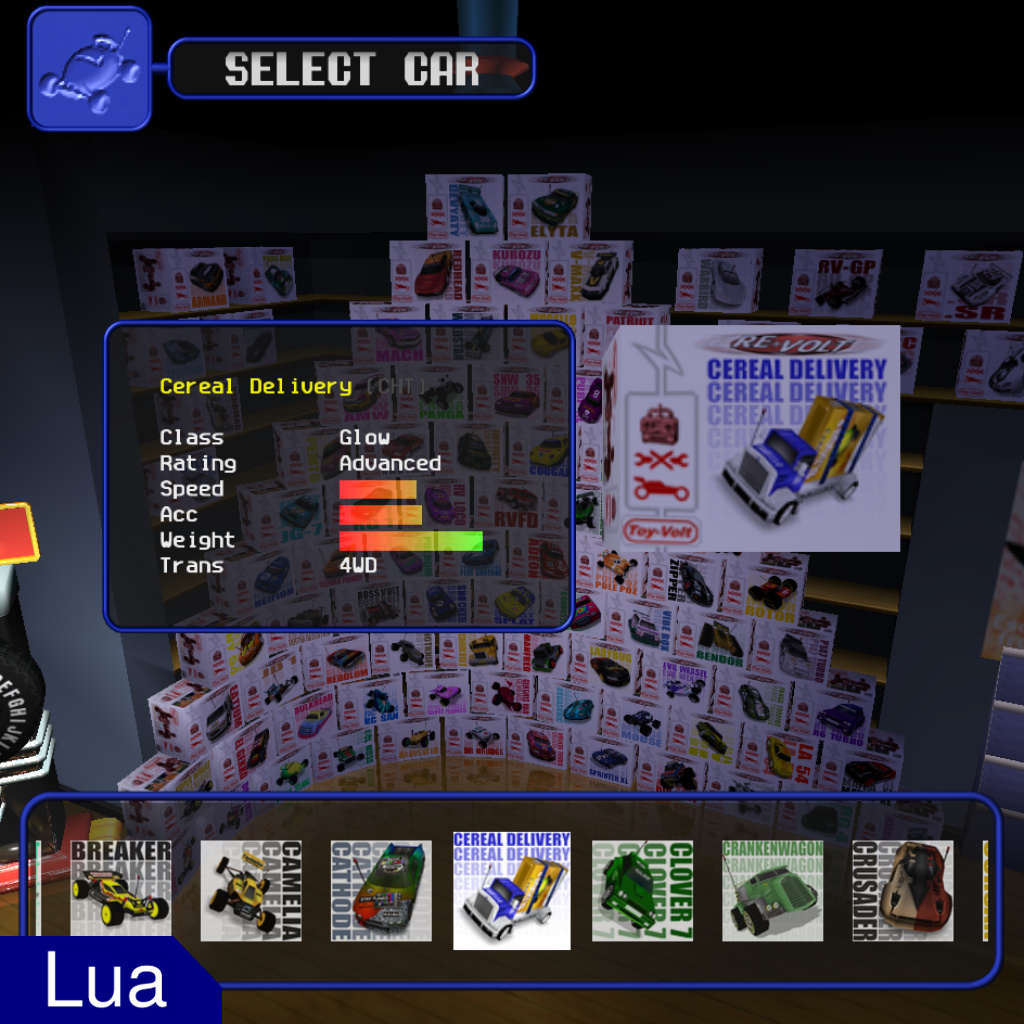
3) An additional interface to better visualize custom cars in the car selection screen (it will also display locked cars)
4) A ready to use modded track layout that sorts some popular tracks by difficulty alongside stock tracks.
5) A ready to use modded default frontend with a custom carbox layout that adds the following cars:
Preview Video:
_________________________________
How to uninstall:
To revert the changes on the Default Frontend, delete the frontend folder inside levels folder, download the original Default Frontend and extract frontend in the previous folder where you deleted the first folder
_________________________________
How to make your own carbox layout file:
first of all you need to specify from where the carbox textures for the new added carboxes will start in the frontend you want this carbox layout to be used (0 is frontenda.bmp, 1 is frontendb.bmp ... 7 is frontendh.bmp ... etc). And you can do this by adding:
carbox_texture_start=your_texture_id
then after that you can define all your carboxes in the EXACT order you want them to be selected (you must include the stock cars too if you still want them to show up in the selection screen), by including the car folder name you want the carbox to be associated with, the xyz position of the carbox and the yaw rotation.
Example:
carbox_texture_start=7 # this means that our custom carbox textures will start from the frontendh.bmp file (or whatever frontend name h.bmp file we are using)
folder=rc x=1079.26 y=-68.12 z=1515.27 yaw=-13.0 # RC Bandit
folder=mite x=1277.59 y=-68.11 z=1537.10 yaw=0.0 # Dust Mite
folder=phat x=1476.26 y=-68.59 z=1505.74 yaw=14.0 # Phat Slug
folder=moss x=1670.87 y=-68.69 z=1415.74 yaw=36.0 # Col. Moss
folder=mud x=1817.98 y=-68.95 z=1268.40 yaw=52.2 # Harvester
folder=beatall x=1921.99 y=-68.71 z=1085.08 yaw=68.8 # Dr. Grudge
folder=volken x=1969.02 y=-68.82 z=890.35 yaw=83.5 # Volken Turbo
folder=tc6 x=1980.4 y=-68.82 z=700.14 yaw=88.0 # Sprinter XL
folder=bigvolt x=1985.8 y=-68.82 z=512.22 yaw=90.0 # BigVolt (modded selection order, this makes BigVolt selected right after Sprinter XL!)
folder=lib2d_tesla x=1985.8 y=-68.82 z=332.2 yaw=90 # Tesla (added car!)
folder=fd117rg4 x=1985.8 y=-68.82 z=154.2 yaw=90 # RG 4 (added car!)
folder=hurri x=1985.8 y=-68.82 z=-25.8 yaw=90 # Hurricane (added car!)
... rest of the cars ... (the entire file is included in the download, also the download includes the stock DC carbox layout file too inside the "extended_frontend_additional_files" folder).
![[Lua] Car Game Mode](https://www.revoltworld.net/wp-content/uploads/2026/04/260410154425488314-200x200.jpg "[Lua] Car Game Mode")
![[Lua] Additional Unlocks](https://www.revoltworld.net/wp-content/uploads/2026/04/260410141626593972-200x200.jpg "[Lua] Additional Unlocks")
![[Lua Utility] Custom Gui Utility](https://www.revoltworld.net/wp-content/uploads/2026/03/260331120406178863-200x200.jpg "[Lua Utility] Custom Gui Utility")
![[Lua] Additional Cheats](https://www.revoltworld.net/wp-content/uploads/2026/04/260410091212531038-200x200.jpg "[Lua] Additional Cheats")





@𝓒𝓪𝓬𝓽𝓸𝓴𝓲𝓷𝓰 :3
it depends on the unlock methods the car you choosed have, this script only adds the cars to the frontned, but it doesn’t change the unlock methods, most custom cars have obtain set to 0 (which means that the car is unlocked by default) but if you still see them locked it could be that the cars you choosed have an obtain method defined in the parameters OR you are using additional_unlocks.lua mod too and the cars have a custom unlock method (if you are using the carbox layout i provided in the download file, then all these cars have a custom unlock rule defined in additional_unlocks.lua, you can check these unlock rules in mods\additional_unlocks_data\unlock_rules.txt)
how to unlock special cars? by normal playing i can unlock only DC and stock cars, how am i suposed to unlock rest?
@Xarc
Never mind, I’d misspelled the name of one folder, which meant the whole mod wasn’t working. However, another problem has appeared. After unlocking a car, e.g. Mouse, by winning single races, I can’t select it. I can see that its carbox has appeared, but when it should be the next car to be selected, I’m instead returned to the start – to the RC Bandit. The only way to select it is to type its name or use the ‘carnival’ cheat. With this cheat enabled, everything works as it should.
How can I fix this?
modloader.log file says i dont have car “Patriot” but it is in game files. also it showes i dont have many diffrient cars that arent even on list. please help with this, here or on discord.
Nice work bro is amazing working
@pr0styyy
have you checked the modloader.log file?
if you think there is nothing suspicious in the log file i will make a debug version of the script as soon as i have time, to find what is going wrong
@parkroy
I’ve got the same problem. All the other mods work fine, but I’m having trouble with this one. I swapped the folders for the cars I don’t use with those for the ones I do use, but the boxes only show stock and DC cars. There are no custom cars.
@Dioda313
If you mean you want the orginal carbox layout and just keep the carbox preview GUI, you can do that by not installing the frontend files (use your unmodded frontend) and remove the “carbox_layout_frontend.txt” file from your mods folder (basically you only need the extended_frontend.lua file in your mods folder and ignore the layout txt file and the modded frontend folder)
@parkroy
– make sure you installed the lua modloader: https://www.revoltworld.net/dl/rvgl-lua-modloader/
– make sure you are using the correct game version for the modloader: Build 23.1030a1 – win64
– make sure you installed the Custom gui utility library: https://www.revoltworld.net/dl/lua-utility-custom-gui-utility/
– check modloader.log for any error
@parkroy you must install all cars listed in the description. If you open modloader.log file (in the main folder of your game installation) with a text editor, at the bottom of the text you’ll find the folder names of which cars are missing.
I have a problem. I added all of the stuff to mods and levels, but inside the frontend, the boxes will only show stock + dc cars with no custom ones. Also the shelves are extended with no custom boxes filled in. how to fix this
I love that additional frame at the bottom of car selection. Is it possible for a script with only that? And default cars in that frame would be great too.